Telemetry integration
Sense Aeronautics' API allows for the integration of telemetry data to enhance its detection and analysis capabilities and enable the estimation of the geolocation coordinates of detected targets.
Different channels and telemetry formats are supported. They must be configured on source registration, using the POST /stream endpoint. Available options for channel and format are explained in the next sections, as well as the required telemetry data.
Telemetry fields
The sense telemetry format accepts the following fields:
| Field | Unit | Description | Required?* |
|---|---|---|---|
sensor_hfov |
degrees | Horizontal field of view of the camera | Always |
sensor_vfov |
degrees | Vertical field of view of the camera | Always |
camera_yaw |
degrees | Horizontal heading the camera is pointing toward | Non-AOD scenarios |
camera_pitch |
degrees | Vertical angle of the camera (negative = downward) | Non-AOD scenarios |
camera_roll |
degrees | Roll angle of the camera | Non-AOD scenarios |
altitude |
metres AMSL | Altitude of the camera above mean sea level | Non-AOD scenarios |
rel_altitude |
metres | Height of the camera above ground level | Non-AOD scenarios |
latitude |
decimal degrees | WGS-84 latitude of the camera | Non-AOD scenarios |
longitude |
decimal degrees | WGS-84 longitude of the camera | Non-AOD scenarios |
timestamp |
seconds (epoch) | Unix time at which the telemetry was sampled | Optional |
speed |
m/s | Speed of the drone | Optional |
*All Always and Non-AOD scenarios fields are required for full geolocation estimation. However, a reduced telemetry mode is available for AOD scenarios, provided that the sensor horizontal and vertical field of views are provided. The following data is provided in each mode:
| Mode | Fields required | Capabilities |
|---|---|---|
| Reduced | sensor_hfov, sensor_vfov |
Angular position (azimuth, elevation) and line-of-sight distance |
| Full geolocation | All Always and Non-AOD fields | Angular position, distance, and GPS coordinates |
Message format
Different message formats are supported:
-
sense: a json message with the fields described in Telemetry fields. For example:{ "timestamp": 1707553200.23, "latitude": 37.774929, "longitude": -122.419418, "speed": 12.35, "sensor_hfov": 90.0, "sensor_vfov": 60.0, "camera_pitch": -10.5, "camera_yaw": 250.75, "camera_roll": 2.3, "altitude": 120.5, "rel_altitude": 50.0 } -
dji: the format used by DJI's Flighthub 2 Sync Telemetry Forwarding system. Check supported payloads at DJI official documentation. If you run into problems with telemetry when using the API, contact support@senseaeronautics.com.
Different formats may be agreed upon with Sense Aeronautics to better suit your needs.
Transmission channel
Three channels are available for providing telemetry data to the API: MQTT, websocket and static. These are configured on source registration with the "telemetry_type" key.
MQTT connection
MQTT is a widely extended, lightweight, publish-subscribe messaging protocol. The user must provide the MQTT broker where the drone telemetry is being posted to and provide its ip, port and topic through the POST /stream endpoint. For example:
{
  "alias": "Example MQTT stream",
  "input_url": "rtsp://1.2.3.4:5000",
  "telemetry_cfg": {
    "format": "sense",
    "parameters": {
      "ip": "127.0.0.1",
      "port": 1883,
      "topic": "drone/telemetry/data"
    },
    "type": "mqtt"
  }
}
Note
The broker must be up and running when the process starts. Otherwise, no telemetry information will be ingested by the API.
Websocket connection
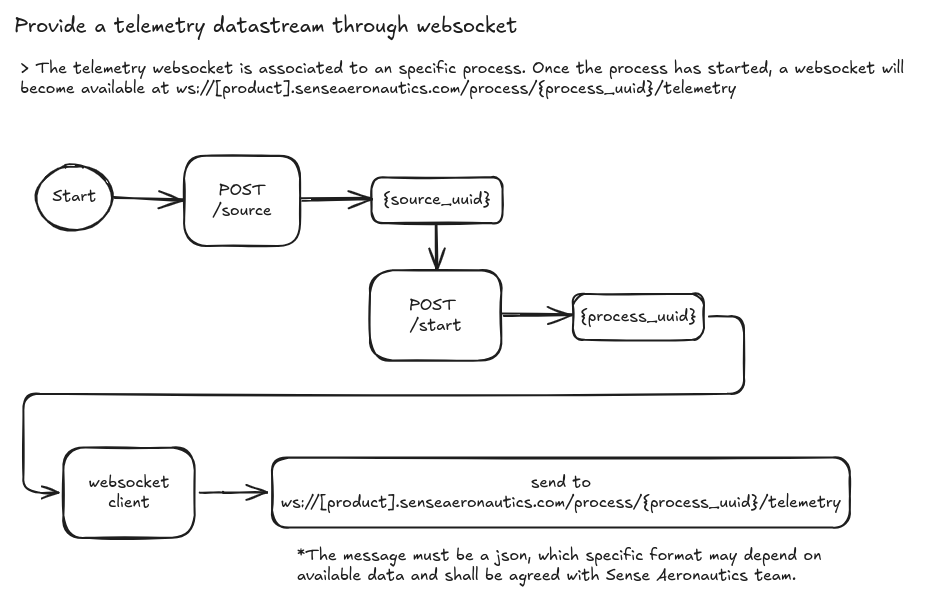
A websocket "endpoint" will become available once a Process starts (see input workflow). Each process will be assigned a unique process_uuid, which shall be used to connect to the corresponding websocket endpoint, at:
ws://[product].senseaeronautics.com/process/<process_uuid>/telemetry
So, the overall process to integrate telemetry data through websocket would be:
Websocket streaming scripts
Websockets is a widely extended communication protocol, available in most popular programming languages. Here are examples of how to write to a websocket using Python or Javascript:
Python
"""
Example script for streaming telemetry data to Sense Aeronautics API using websockets
"""
import asyncio
import websockets
import json


async def send_telemetry():
    uri = "ws://atr.senseaeronautics.com/process/{process_uuid}/telemetry"

    async with websockets.connect(uri) as websocket:
        telemetry_data = {
            "timestamp": 1704110400.0,
            "latitude": 37.7749,
            "longitude": -122.4194,
            "altitude": 100,
            "rel_altitude": 100,
            "speed": 10,
            "sensor_hfov": 90,
            "sensor_vfov": 60,
            "camera_yaw": 90,
            "camera_pitch": 0,
            "camera_roll": 0
        }

        message = json.dumps(telemetry_data)

        try:
            while True:
                await websocket.send(message)
                print(f"Sent: {message}")
                await asyncio.sleep(1)
        except websockets.ConnectionClosed as e:
            print(f"Connection closed with error: {e}")

asyncio.get_event_loop().run_until_complete(send_telemetry())
Javascript
// requirements: npm install ws
// Insert in {process_uuid} your process_uuid"""
const WebSocket = require('ws');

async function sendTelemetry() {
    const uri = "ws://atr.senseaeronautics.com/process/{process_uuid}/telemetry";
    const ws = new WebSocket(uri);

    ws.on('open', () => {
        console.log("Connection opened");

        const telemetryData = {
            "timestamp": 1704110400.0,
            "latitude": 37.7749,
            "longitude": -122.4194,
            "altitude": 100,
            "rel_altitude": 100,
            "speed": 10,
            "sensor_hfov": 90,
            "sensor_vfov": 60,
            "camera_yaw": 90,
            "camera_pitch": 0,
            "camera_roll": 0
        };

        // Convert data to JSON string
        const message = JSON.stringify(telemetryData);

        const sendMessage = () => {
            ws.send(message, (err) => {
                if (err) {
                    console.error('Error sending message:', err);
                } else {
                    console.log(`Sent: ${message}`);
                }
            });
        };

        // Send message every 1 second
        const intervalId = setInterval(sendMessage, 1000);

        ws.on('close', (code, reason) => {
            console.log(`Connection closed: ${code} - ${reason}`);
            clearInterval(intervalId);
        });

        ws.on('error', (error) => {
            console.error(`WebSocket error: ${error}`);
        });
    });
}

sendTelemetry();
Static telemetry
Static telemetry is designed for cases in which realtime telemetry is not available but relevant data (like camera field of view or location) are known before-hand. It is also useful when metadata is not expected to change, like when using fixed cameras.
Parameters must be provided on source creation like this:
{
  "alias": "Telemetry stream",
  "input_url": "rtmp://192.168.1.10/stream/test",
  "stream_type": "rtsp",
  "telemetry_cfg": {
    "type": "static",
    "format": "sense",
    "parameters": {
      "sensor_hfov": 90.0,
      "sensor_vfov": 60.0,
      "rel_altitude": 30.0,
      "camera_pitch": -45.0,
      "latitude": 41.3851,
      "longitude": 2.1734,
      "altitude": 150.0,
      "camera_yaw": 0.0,
      "camera_roll": 0.0
    }
  }
}
Note
sense is the only supported format for static telemetry
parameters accepts the fields described in Telemetry fields. Only sensor_hfov and sensor_vfov are required (reduced mode); include the camera position and orientation fields to enable full geolocation.